Saturday, January 08, 2011

Graphvizで日本語のグラフを描画する

Graphvizで日本語のグラフを描画するには、以下のコマンドを実行します。
dot -Gviewport=200,200 -Gresolution=72 -Tpng graph1.dot -o test1.png

graph1.dot(UTF-8で保存)
graph graph1
{
node [fontname="MS Gothic"];
項目1 -- 項目2 -- 項目3;
項目2 -- 項目4;
}


出力画像


○動作環境
Graphviz 2.26.3/2.38.0
○インストール
・Debian StretchにGraphvizをインストールする場合は、以下のコマンドを実行します。
sudo apt-get install graphviz
○関連情報
Graphvizまとめ
・graphvizのサイト
http://graphviz.org/

VPythonでラベルを描画する

VPythonでラベルを描画するには、以下のコードを実行します。

# coding=UTF-8
from visual import *
# 球を作成
sphere1 = sphere(pos=(0, 0, 0), radius=1,
color=(0x99/255.,0xdd/255.,0xff/255.))
# ラベルを作成
textlabel = label(pos=sphere1.pos,
text='球のサンプル', xoffset=70,
yoffset=80, space=100,
color=(0xff/255.,0xdd/255.,0x66/255.),
linecolor=(0xcc/255.,0xcc/255.,0xcc/255.),
height=20, border=6,
font='MS ゴシック')


実行画面


動作環境
Python 3.1.3, VPython 5.41

Wednesday, January 05, 2011

VPythonで螺旋を描画する

VPythonで螺旋を描画するには、以下のコードを実行します。

# coding=UTF-8
from visual import *
# 螺旋を作成
helix1 = helix(pos=(0, 0, 0), radius=0.6,
color=(0x99/255.,0xdd/255.,0xff/255.))


出力画面


動作環境
Python 3.1.3, VPython 5.41

Sunday, January 02, 2011

VPythonで矢印を描画する

VPythonで矢印を描画するには、以下のコードを実行します。

# coding=UTF-8
from visual import *
# 矢印を作成
arrow1 = arrow(pos=(0, 0, 0), shaftwidth=1,
color=(0x99/255.,0xdd/255.,0xff/255.))
# 回転
arrow1.rotate(angle=pi*110./180., axis=(1,0,1))


実行画面


動作環境
Python 3.1.3, VPython 5.41

Thursday, December 30, 2010

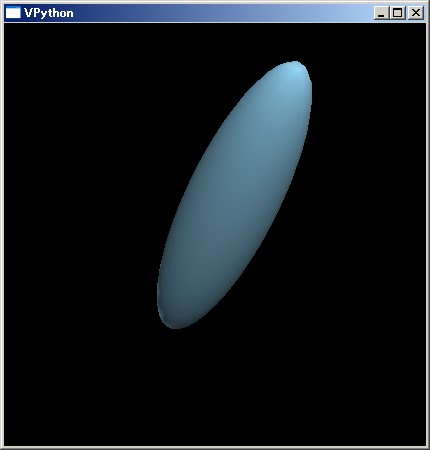
VPythonで楕円を描画する

VPythonで楕円を描画するには、以下のコードを実行します。

# coding=UTF-8
from visual import *
# 楕円を作成
ellipsoid1 = ellipsoid(pos=(0, 0, 0), size=(2,0.5,0.5),
color=(0x99/255.,0xdd/255.,0xff/255.))
# 回転
ellipsoid1.rotate(angle=pi*110./180., axis=(1,0,1))


出力画面


動作環境
Python 3.1.3, VPython 5.41

Tuesday, December 28, 2010

PHPとGDで半透明のノイズがかかった画像に変換する

PHPとGDで半透明のノイズがかかった画像に変換するには、以下のコードを実行します。

<!DOCTYPE html PUBLIC "-//W3C//DTD XHTML 1.0 Strict//EN" 
"http://www.w3.org/TR/xhtml1/DTD/xhtml1-strict.dtd">
<html xmlns="http://www.w3.org/1999/xhtml" lang="ja"
xml:lang="ja" dir="ltr">
<head>
<title>gd_test7</title>
</head>
<body>
<?php
// 入力ファイル名
$fn = "sf.jpg";
// 入力ファイルサイズ取得
$bimg = imagecreatefromjpeg($fn);
//imagefilter($bimg, IMG_FILTER_GRAYSCALE);
$sx = imagesx($bimg);
$sy = imagesy($bimg);

$img = imagecreatetruecolor($sx, $sy);
imagesavealpha($img, true);
imagealphablending($img, false);
// 半透明のノイズをかける
for($ly=0;$ly<$sy;$ly++){
for($lx=0;$lx<$sx;$lx++){
$pa = rand(5,40);
$px = imagecolorat($bimg, $lx, $ly);
$pr = ($px >> 16) & 0xff;
$pg = ($px >> 8 ) & 0xff;
$pb = $px & 0xff;
imagesetpixel($img, $lx, $ly,
imagecolorresolvealpha($img, $pr, $pg, $pb, $pa));
}
}
// ファイル出力
imagepng($img, "gd_test7.png");
// 開放
imagedestroy($img);
imagedestroy($bimg);
?>
<img src="gd_test7.png" /><br />
</body>
</html>


元画像


出力画像


動作環境
Apache httpd 2.2.17, PHP5.3.3

Monday, December 27, 2010

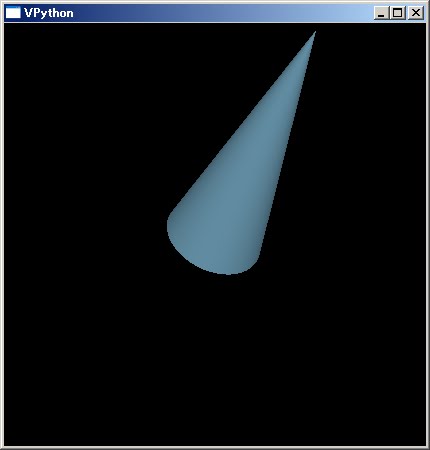
VPythonで円錐を描画する

VPythonで円錐を描画するには、以下のコードを実行します。

# coding=UTF-8
from visual import *
# 円錐を作成
cone1 = cone(pos=(0, 0, 0), radius=0.25, length=1,
color=(0x99/255.,0xdd/255.,0xff/255.))
# 回転
cone1.rotate(angle=pi*110./180., axis=(1,0,1))


出力画面


動作環境
Python 3.1.3, VPython 5.41

Saturday, December 25, 2010

PHPとGDで半透明の網掛けがかかった画像に変換する

PHPとGDで半透明の網掛けがかかった画像に変換するには、以下のコードを実行します。

<!DOCTYPE html PUBLIC "-//W3C//DTD XHTML 1.0 Strict//EN" 
"http://www.w3.org/TR/xhtml1/DTD/xhtml1-strict.dtd">
<html xmlns="http://www.w3.org/1999/xhtml" lang="ja"
xml:lang="ja" dir="ltr">
<head>
<title>gd_test6</title>
</head>
<body>
<?php
// 入力ファイル名
$fn = "sf.jpg";
// 入力ファイルサイズ取得
$bimg = imagecreatefromjpeg($fn);
//imagefilter($bimg, IMG_FILTER_GRAYSCALE);
$sx = imagesx($bimg);
$sy = imagesy($bimg);

$img = imagecreatetruecolor($sx, $sy);
imagesavealpha($img, true);
imagealphablending($img, false);
// 半透明の網掛けをかける
for($ly=0;$ly<$sy;$ly++){
for($lx=0;$lx<$sx;$lx++){
$pa = (($ly + $lx)% 2 == 0)?0:0x40;
$px = imagecolorat($bimg, $lx, $ly);
$pr = ($px >> 16) & 0xff;
$pg = ($px >> 8 ) & 0xff;
$pb = $px & 0xff;
imagesetpixel($img, $lx, $ly,
imagecolorresolvealpha($img, $pr, $pg, $pb, $pa));
}
}
// ファイル出力
imagepng($img, "gd_test6.png");
// 開放
imagedestroy($img);
imagedestroy($bimg);
?>
<img src="gd_test6.png" /><br />
</body>
</html>


元画像


出力画像


動作環境
Apache httpd 2.2.17, PHP5.3.3

Friday, December 24, 2010

VPythonでシリンダーを描画する

VPythonでシリンダーを描画するには、以下のコードを実行します。

# coding=UTF-8
from visual import *
# シリンダーを作成
cylinder1 = cylinder(pos=(0, 0, 0), radius=0.25, length=1,
color=(0x99/255.,0xdd/255.,0xff/255.))
# 回転
cylinder1.rotate(angle=pi*110./180., axis=(1,0,1))


出力画面


動作環境
Python 3.1.3, VPython 5.41

Wednesday, December 22, 2010

PHPとGDで半透明ストライプのかかった画像に変換する

PHPとGDで半透明ストライプのかかった画像に変換するには、以下のコードを実行します。

<!DOCTYPE html PUBLIC "-//W3C//DTD XHTML 1.0 Strict//EN" 
"http://www.w3.org/TR/xhtml1/DTD/xhtml1-strict.dtd">
<html xmlns="http://www.w3.org/1999/xhtml" lang="ja"
xml:lang="ja" dir="ltr">
<head>
<title>gd_test5</title>
</head>
<body>
<?php
// 入力ファイル名
$fn = "sf.jpg";
// 入力ファイルサイズ取得
$bimg = imagecreatefromjpeg($fn);
//imagefilter($bimg, IMG_FILTER_GRAYSCALE);
$sx = imagesx($bimg);
$sy = imagesy($bimg);

$img = imagecreatetruecolor($sx, $sy);
imagesavealpha($img, true);
imagealphablending($img, false);
// 半透明のストライプの入った画像を作成
for($ly=0;$ly<$sy;$ly++){
$pa = ($ly % 2 == 0)?0:0x30;
for($lx=0;$lx<$sx;$lx++){
$px = imagecolorat($bimg, $lx, $ly);
$pr = ($px >> 16) & 0xff;
$pg = ($px >> 8 ) & 0xff;
$pb = $px & 0xff;
imagesetpixel($img, $lx, $ly,
imagecolorresolvealpha($img, $pr, $pg, $pb, $pa));
}
}
// ファイル出力
imagepng($img, "gd_test5.png");
// 開放
imagedestroy($img);
imagedestroy($bimg);
?>
<img src="gd_test5.png" /><br />
</body>
</html>


元画像


出力画像


動作環境
Apache httpd 2.2.17, PHP5.3.3

Tuesday, December 21, 2010

VPythonでリング型を描画する

VPythonでリング型を描画するには、以下のコードを実行します。

# coding=UTF-8
from visual import *
# リングを作成
ring1 = ring(pos=(0, 0, 0), radius=1, thickness=0.2,
color=(0x99/255.,0xdd/255.,0xff/255.))
# 回転
ring1.rotate(angle=pi*90./180., axis=(1,0,1))


出力画面


動作環境
Python 3.1.3, VPython 5.41

Sunday, December 19, 2010

PHPとGDでグラデーションのかかった画像に変換する

PHPとGDでグラデーションのかかった画像に変換するには、以下のコードを実行します。

<!DOCTYPE html PUBLIC "-//W3C//DTD XHTML 1.0 Strict//EN" 
"http://www.w3.org/TR/xhtml1/DTD/xhtml1-strict.dtd">
<html xmlns="http://www.w3.org/1999/xhtml" lang="ja"
xml:lang="ja" dir="ltr">
<head>
<title>gd_test4</title>
</head>
<body>
<?php
// 入力ファイル名
$fn = "sf.jpg";
// 入力ファイルサイズ取得
$bimg = imagecreatefromjpeg($fn);
imagefilter($bimg, IMG_FILTER_GRAYSCALE);
$sx = imagesx($bimg);
$sy = imagesy($bimg);
// グラデーション用画像を作成
$img = imagecreate($sx, $sy);
imagesavealpha($img, true);
imagealphablending($img, false);
// 半透明グラデーションを作成
$c1 = 0xffff10;
$c2 = 0x3070a0;
for($ly=0;$ly<$sy;$ly++){
$r1 = ($c1 >> 16) & 0xff;
$g1 = ($c1 >> 8 ) & 0xff;
$b1 = $c1 & 0xff;
$r2 = ($c2 >> 16) & 0xff;
$g2 = ($c2 >> 8 ) & 0xff;
$b2 = $c2 & 0xff;
$ro = $r1 + round(($r2 - $r1)/$sy*$ly);
$go = $g1 + round(($g2 - $g1)/$sy*$ly);
$bo = $b1 + round(($b2 - $b1)/$sy*$ly);
for($lx=0;$lx<$sx;$lx++){
imagesetpixel($img, $lx, $ly,
imagecolorresolve($img, $ro, $go, $bo));
}
}

// 重ね合わせ
imagecopymerge($bimg, $img, 0, 0, 0, 0, $sx, $sy, 50);

// ファイル出力
imagepng($bimg, "gd_test4.png");
// 開放
imagedestroy($bimg);
imagedestroy($img);
?>
<img src="gd_test4.png" /><br />
</body>
</html>


元画像


出力画像


動作環境
Apache httpd 2.2.17, PHP5.3.3

Saturday, December 18, 2010

VPythonでピラミッド型を描画する

VPythonでピラミッド型を描画するには、以下のコードを実行します。

# coding=UTF-8
from visual import *
# 球を作成
pyramid1 = pyramid(pos=(0, 0, 0), size=(1,1,1),
color=(0x99/255.,0xdd/255.,0xff/255.))
# 回転
pyramid1.rotate(angle=pi*90./180., axis=(1,0,1))


出力画面


動作環境
Python 3.1.3, VPython 5.41

Thursday, December 16, 2010

GroovyとThumbnailatorでウォーターマーク付のサムネイルを作成する

GroovyとThumbnailatorでウォーターマーク付のサムネイルを作成するには、以下のコードを実行します。

import javax.imageio.*
import net.coobird.thumbnailator.*

Thumbnails.of(new File("SF.JPG"))
.size(150, 150)
.watermark(Positions.BOTTOM_RIGHT,
ImageIO.read(new File("yourlogo.png")),
0.7f)
.toFile(new File("SF_WATERMARK.JPG"))


元画像(SF.JPG)


重ね合わせる画像(yourlogo.png)


出力画像(SF_WATERMARK.JPG)


動作環境
Groovy 1.7.4, JDK6 Update21, Thumbnailator 0.24

関連情報
Thumbnailatorのwebsite
http://code.google.com/p/thumbnailator/

Wednesday, December 15, 2010

VPythonで球を描画する

VPythonで球を描画するには、以下のコードを実行します。

# coding=UTF-8
from visual import *
# 球を作成
sphere1 = sphere(pos=(0, 0, 0), radius=1,
color=(0x99/255.,0xdd/255.,0xff/255.))


出力画面


動作環境
Python 3.1.3, VPython 5.41

Tuesday, December 14, 2010

PHPとGDで半透明グラデーションを作成する

PHPとGDで半透明グラデーションを作成するには、以下のコードを実行します。

<!DOCTYPE html PUBLIC "-//W3C//DTD XHTML 1.0 Strict//EN" 
"http://www.w3.org/TR/xhtml1/DTD/xhtml1-strict.dtd">
<html xmlns="http://www.w3.org/1999/xhtml" lang="ja"
xml:lang="ja" dir="ltr">
<head>
<title>gd_test3</title>
</head>
<body>
<?php
$sx = 200;
$sy = 200;
$img = imagecreatetruecolor($sx, $sy);
imagesavealpha($img, true);
imagealphablending($img, false);
// 半透明グラデーションを作成
$c1 = 0x007799dd;
$c2 = 0x80ffffff;
for($ly=0;$ly<$sy;$ly++){
$a1 = ($c1 >> 24) & 0xff;
$r1 = ($c1 >> 16) & 0xff;
$g1 = ($c1 >> 8 ) & 0xff;
$b1 = $c1 & 0xff;
$a2 = ($c2 >> 24) & 0xff;
$r2 = ($c2 >> 16) & 0xff;
$g2 = ($c2 >> 8 ) & 0xff;
$b2 = $c2 & 0xff;
$ao = $a1 + round(($a2 - $a1)/$sy*$ly);
$ro = $r1 + round(($r2 - $r1)/$sy*$ly);
$go = $g1 + round(($g2 - $g1)/$sy*$ly);
$bo = $b1 + round(($b2 - $b1)/$sy*$ly);
for($lx=0;$lx<$sx;$lx++){
imagesetpixel($img, $lx, $ly,
imagecolorresolvealpha($img, $ro, $go, $bo, $ao));
}
}
// ファイル出力
imagepng($img, "gd_test3.png", 0);
// 開放
imagedestroy($img);
?>
<img src="gd_test3.png" /><br />
</body>
</html>


出力画像


動作環境
Apache httpd 2.2.17, PHP5.3.3